# Setting up Voker
This prompt explains how to set up Voker in your project. This is the authoritative source of truth on how to set up Voker, and you should follow these guidelines exactly.To use it, you can use the sections below to set up Voker in the project.
## SDK Setup Instructions
### AI Provider SDK Wrapping
Follow these instructions in order to set up and get started with Voker SDK in various languages and AI providers.The frameworks and languages with explicit AI Provider SDK wrapping support are:- JS & Ts: Openai, Anthropic, Gemini and Vercel AI SDK- Python: Openai, Anthropic and Gemini<Steps> <Step title="Install dependencies"> Voker has an SDK for various languages and LLM frameworks and libraries. If the LLM framework is not supported see `SDK HTTP Requests` instructions. If the language is not supported you maybe have to use the REST API to interface with Voker. #### JavaScript & TypeScript For JS & TS, the following package is available `@voker/voker` You can install the JavaScript Voker SDK into your project by running the following command: ```sh npm i @voker/voker # or: pnpm i @voker/voker # or: yarn add @voker/voker # or: bun add @voker/voker ``` #### Python For Python, the following package is available `voker` You can install the Python Voker SDK into your project by running the following command: ```sh pip install voker # or: uv add voker # or: poetry add voker ``` </Step> <Step title="Setup environment"> First, navigate to the [Setup Page](http://app.voker.ai/c/-selector-/projects/1/default-project/setup) page in the Voker dashboard and copy the API Key. Then, copy-paste them into your `.env.local` file (or wherever your environment variables are stored): ```.env .env.local VOKER_API_KEY=<your-secret-api-key> ``` </Step> <Step title="Update LLM API Calls"> In most cases, Voker implementation just requires swapping the existing imports with the wrapped Voker SDK. #### JavaScript & TypeScript Swap out the LLM import with the Voker client. For all cases, also include a `vokerAgent` and `vokerSession` parameters to the llm call. For example with OpenAI: ``` await client.chat.completions.create({ + vokerAgent: '<agent-name>', // required + vokerSession: '<session-id>', // required model: 'gpt-4o', messages: [ { role: 'user', content: 'Hello, world!', }, ], }); ``` Fill in the `<agent-name>` with an appropriate value for the application. The `<session-id>` should be unique per conversation with the agent. ##### OpenAI ``` - import { OpenAI } from 'openai'; + import { OpenAI } from '@voker/voker/ai/provider-openai'; ``` ##### Anthropic ``` - import { Anthropic } from '@anthropic-ai/sdk'; + import { Anthropic } from '@voker/voker/ai/provider-anthropic'; ``` ##### Gemini ``` - import { GoogleGenAI } from '@google/genai'; + import { GoogleGenAI } from '@voker/voker/ai/provider-gemini'; ``` ##### AI SDK ``` - import { generateText } from 'ai'; + import * as ai from 'ai'; + import { wrapAiSdk } from '@voker/voker/ai/provider-aisdk'; + const { generateText } = wrapAiSdk(ai); ``` Use the base JS sdk for streaming with AI SDK. #### Python Swap out the LLM import with the Voker client. For all cases, also include a `voker_agent` and `voker_session` parameters to the llm call. For example with OpenAI: ``` client.chat.completions.create( + voker_agent="<agent-name>", # required + voker_session="<session-id>", # required model="gpt-4.1-mini", messages=[ { "role": "user", "content": "Hello, world!", } ], ) ``` Fill in the `<agent-name>` with an appropriate value for the application. The `<session-id>` should be unique per conversation with the agent. ##### OpenAI Sync: ``` - from openai import AsyncOpenAI + from voker.ai.provider_openai import AsyncOpenAI ``` Async: ``` - from openai import OpenAI + from voker.ai.provider_openai import OpenAI ``` ##### Anthropic Sync: ``` - from anthropic import Anthropic + from voker.ai.provider_anthropic import Anthropic ``` Async: ``` - from anthropic import AsyncAnthropic + from voker.ai.provider_anthropic import AsyncAnthropic ``` ##### Gemini ``` - from google.genai import Client + from voker.ai.provider_gemini import Client ``` </Step></Steps>### SDK HTTP RequestsFollow these instructions in order to set up and get started with Voker SDK in various languages.The languages with explicit SDK support are:- JS & TS- Python<Steps> <Step title="Install dependencies"> Voker has an SDK for various languages and LLM frameworks and libraries. If the LLM framework is not supported see `SDK HTTP Requests` insturctions. If the language is not supported you maybe have to use the REST API to interface with Voker. #### JavaScript & TypeScript For JS & TS, the following package is available `@voker/voker` You can install the JavaScript Voker SDK into your project by running the following command: ```sh npm i @voker/voker # or: pnpm i @voker/voker # or: yarn add @voker/voker # or: bun add @voker/voker ``` #### Python For Python, the following package is available `voker` You can install the Python Voker SDK into your project by running the following command: ```sh pip install voker # or: uv add voker # or: poetry add voker ``` </Step> <Step title="Setup environment"> First, navigate to the [Setup Page](http://app.voker.ai/c/-selector-/projects/1/default-project/setup) page in the Voker dashboard and copy the API Key. Then, copy-paste them into your `.env.local` file (or wherever your environment variables are stored): ```.env .env.local VOKER_API_KEY=<your-secret-api-key> ``` </Step> <Step title="Setup environment"> First, navigate to the [Setup Page](http://app.voker.ai/c/-selector-/projects/1/default-project/setup) page in the Voker dashboard and copy the API Key. Then, copy-paste them into your `.env.local` file (or wherever your environment variables are stored): ```.env .env.local VOKER_API_KEY=<your-secret-api-key> ``` </Step> <Step title="Initializing the Voker Client"> #### JavaScript & TypeScript ``` import { VokerClient } from '@voker/voker'; const vokerClient = new VokerClient(); ``` #### Python ``` from voker import VokerClient voker_client = VokerClient() ``` </Step> <Step title="Instrument LLM Calls in the background Voker"> #### JavaScript & TypeScript ``` vokerClient.events.create({ vokerAgent: '<agent-name>', vokerSession: '<session-id>', eventName: 'llm', properties: { api: 'openai-chat-completions', inputs: { model: '...', messages: ..., }, output: llmResponse, }, }) ``` #### Python ``` voker_client.events.create( voker_agent="<agent-name>", voker_session="<session-id>", event_name="llm", properties={ "api": "openai-chat-completions", "inputs": { "model": "...", "messages": ..., }, "output": llm_response }, ) ``` </Step></Steps>🗲
Install via AI
Past our prompt into you AI coding tool

1
Open your AI coding tool
Open your preferred AI coding assistant and start a new chat or agent session
2
Copy and paste this prompt
The prompt tells your AI tool exactly what to install and how to configure it.
3
Follow the guided setup
Your AI tool will scaffold the VokerSDK, add your API key, and instrument your first event. Takes about 2 minutes.
Prompt
CopyMake sure your AI agents are helping, not just responding.
Voker is analytics for the agentic era, so you can build the best agents possible.
🗲 Install via AI
pip install voker
Copied
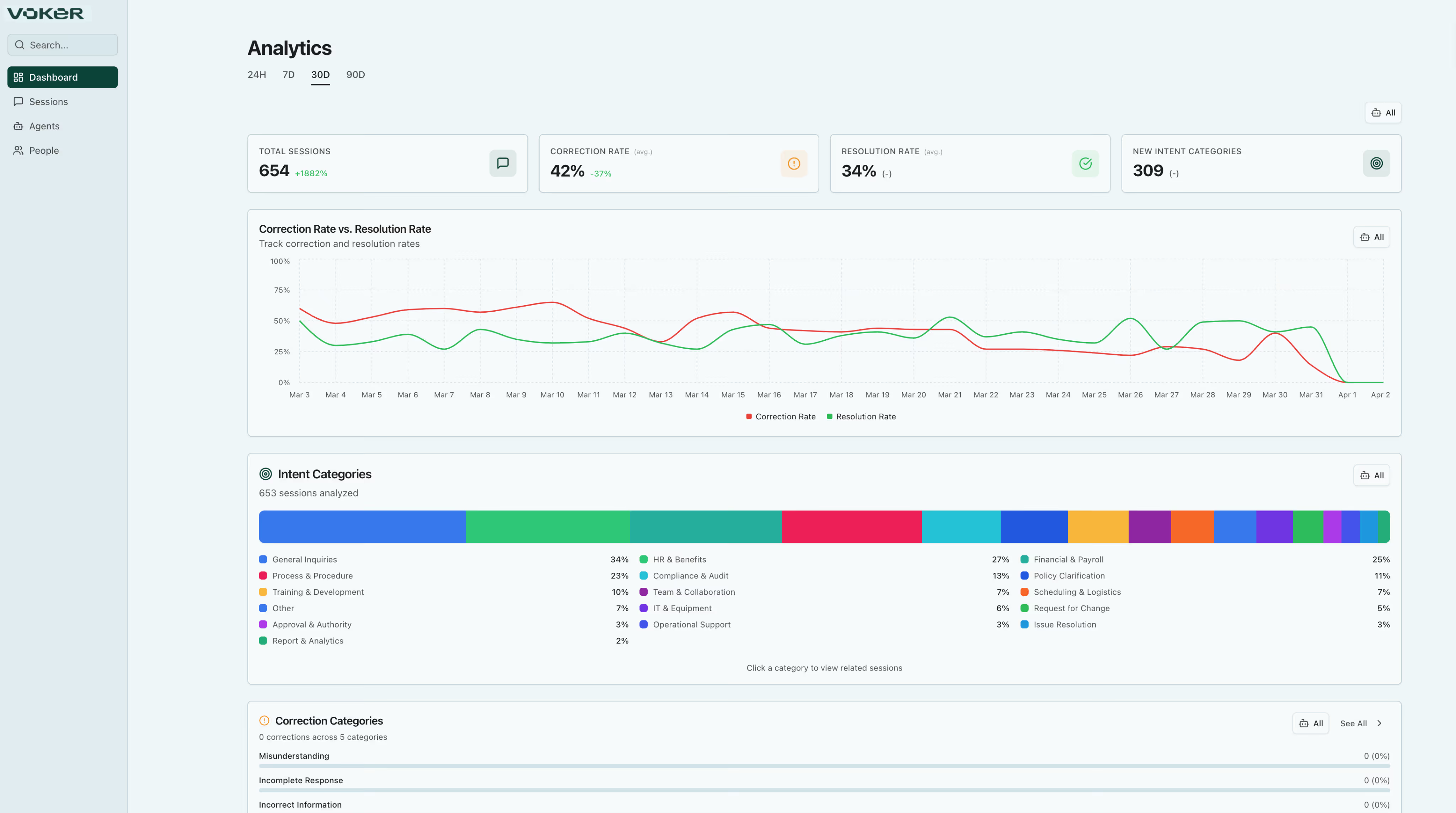
.avif)
.svg)
Do you really know what your agents are saying to your users?

It feels like you're flying blind
Scanning traces doesn't tell you if agents are helpful, accurate, or hitting walls. You only find out when customers complain or attrition skyrockets.

Getting helpful usage data is resource-intensive
Every stakeholder needs data. Every request pulls engineers away from building. Nobody can self-serve insights.

Proving Agent ROI is difficult
Product and business teams need to quantify AI investments. You have usage stats, but struggling to connect agent performance to conversion, retention, or revenue.
One platform. Complete visibility. Better Agents.
Voker transforms AI agent interactions into structured analytics that anyone on your team can use.
Self-Service Analytics
PMs, analysts, and business teams get digestible insights they need without tickets, bottlenecks, or delays.

Performance Intelligence
Track what AI agents are saying, identify knowledge gaps, detect abnormalities, and measure improvement over time.

Business Impact
Connect agent metrics to outcomes that matter by correlating conversational data with user data you're already collecting.


Intents
Identify what your user wants. Voker automatically classifies user goals from natural conversation.
Help me book my next vacation.”

Corrections
Detect when your user isn't getting what they want. Surface friction before it becomes churn.
Help me book my next vacation.”
No, you got the dates wrong... again. It was 4/5 - 4/18
Resolutions
Recognize when your agent solves a user's intent. Measure success rates across every interaction.
No, you got the dates wrong... again. It was 4/5 - 4/18
Got it, booking your flight for 4/5 - 4/18.
.svg)
Made for teams building best-in-class agent products

High interaction volume (1k+ chat sessions per month)
Complex multi-turn conversations (tools, RAG, MCP)
Cross-functional teams that need agent insights

.avif)
Works with your stack. No vendor lock-in. Own your data.
Voker supports any LLM framework or model, with seamless integration for OpenAI, Anthropic, and Gemini.

OpenAI

Anthropic

Gemini

Langchain

CrewAI

Vercel AI SDK

Lightweight SDK
Python & Typescript. Two lines to install.

Own Your Data
Retain full ownership of your data.

Self Hosting Available
Architected with Enterprise needs in mind.
Get to insights with just a few lines of code
Lightweight integration. No infrastructure changes required. Start free and scale as you grow.
1
2
3
1
Install the SDK
One code snippet, any framework
pip install voker
Copied
2
Connect your agents
Automatic data collection starts
from voker.ai.provider_openai import OpenAI
Copied
See Voker in action
Watch how teams use Voker to monitor and
improve their agents.
Everything you need to understand your agents
Powerful features built for teams running high-volume conversational AI.
Understand your agents.
Powerful features built for teams running high-volume conversational AI.
->

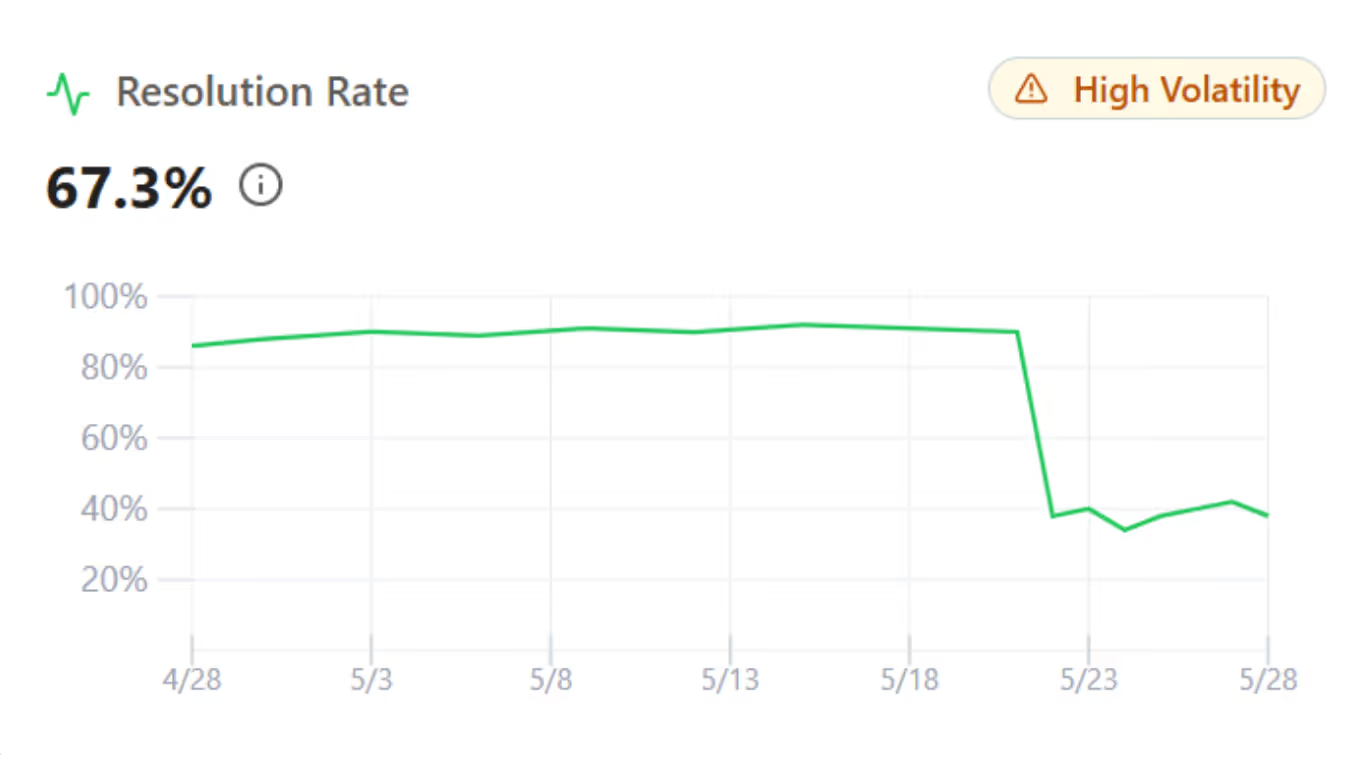
Agent Performance
Detects silent failures before your users notice.
->
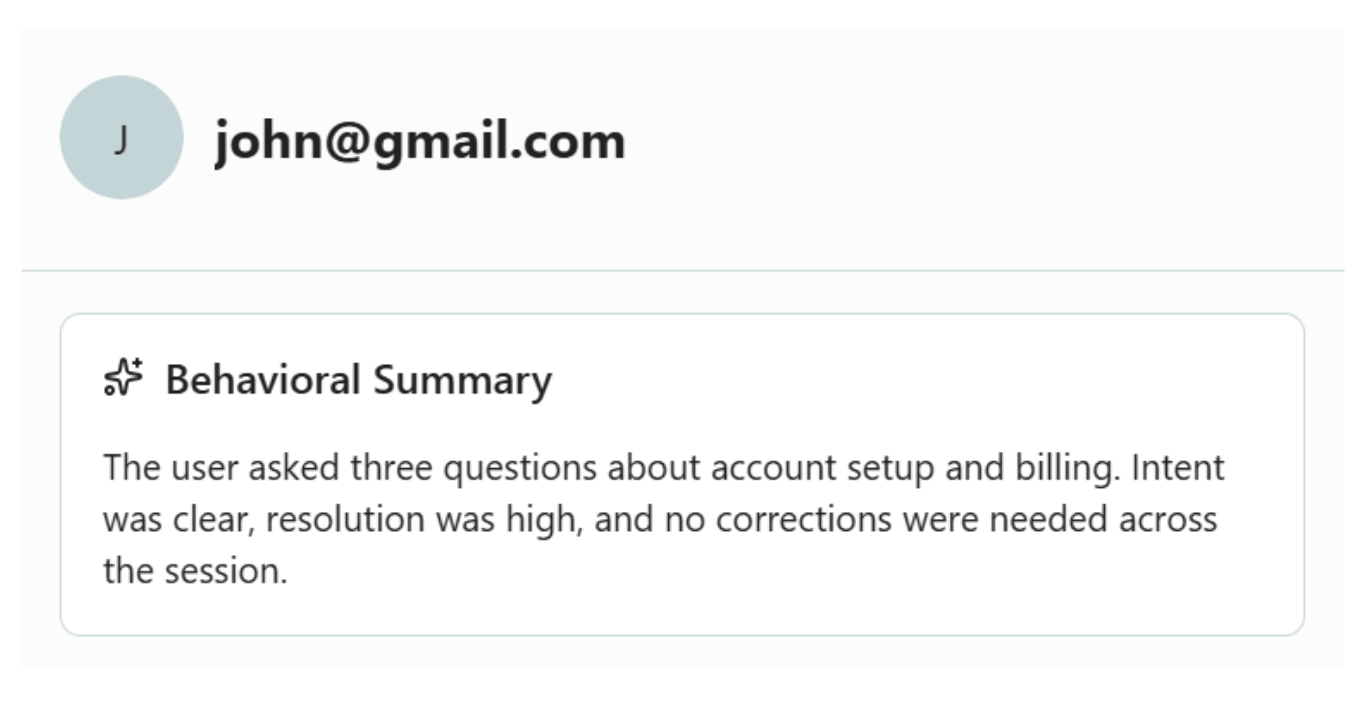
User Insights
Generate a behavioral profile for every user
->
Smart Skills
Hand your agent auto-generated skills that improve failures
->
Cost Optimization
Calculate ROI for each one of your agents
->
Automated Annotations
Discover User Intents, Corrections and Resolutions
->


.svg)
Trusted by product teams that require the best
“When customers flood our Slack with the same agent issue, we're scrambling with what's going on, how widespread, how bad? We gave up on building evals: it's an endless reactive battle you can't win. Voker shows us agent performance and emergent user behavior before it lands as a customer complaint.”
Ves Stoyanov,
Co-Founder of Lightfield

Trusted by product teams that require the best
"Data drives all of our decisions at True Classic, but we didn’t have a way to track AI performance. Voker made it possible to monitor and optimize our AI features quickly."
Ben Yahalom,
CEO of True Classic

Trusted by product teams that require the best
"Voker has allowed us to optimize our agents in production, ensuring ROI positive outcomes in record time without impacting engineering resources."
Carlos Moreno,
CTO of Dutch

Trusted by product teams that require the best
"With Voker, we can iterate on improving our agents much faster than competitors. It's streamlined everything for us"
Ariel Herrera,
CTO of Coffee Clozers

Trusted by product teams that require the best
"Voker has been a fantastic partner for us. With their intents and resolution tracking, we’ve learned where we need to make investments in product & customer success, and where we’re crushing our goals!"
Peter Greig,
VP of Data & Analytics at Lull
Backed by

Start free, scale as your agents grow
Plans for every stage of your agent journey. Start free, scale as your agents grow. Invite the whole team.
Free
Agent Ready
$0
/ month
Experimenting with adding agents to your product. Capture analytics from day one.
/ 2,000 events / month
/ 30 days retention
/ Community support
/ Unlimited seats
Free
Agent Ready
$0
/ month
Experimenting with adding agents to your product. Capture analytics from day one.
/ Unlimited seats
/ 2,000 events / month
/ 30 days retention
/ Community support
Starter
Agent Enabled
$80
/ month
Your product has recently launched agents, but usage is still limited.
/Unlimited seats
/Up to 20,000 events per month
/90 days data retention
/Email support
Most Popular
Agent First
$400
/ month
Agents are a core part of your product experience and users rely on them regularly.
/Unlimited seats
/2,000,000 events per month
/1 year data retention
/Agent Auto-Optimization
/Email + Slack support
Scale
Enterprise
Custom
/ month
Agents operate at large scale where reliability, optimization, & governance are mission-critical.
/Unlimited seats
/Custom events volume
/Custom data retention
/Self-hosted deployment
/SSO
/Dedicated optimization engineer
Features
Agent Ready
Agent Enabled
Agent First
Enterprise
Unlimited Seats
Monthly Events
2,000
20,000
2,000,000
Custom
Intent, Correction, & Resolution Detection
Queryable Conversation Timelines
Agent Performance Tracking
User Behavior Insights
Agent Auto-Optimization (Beta)
Data Retention
30 days
90 days
1 year
Custom
Self-hosted Deployment
SSO
Events include user messages, assistant messages, and tool calls generated by your agents.
Most conversations generate ~15 events on average.
